How to speed up your gitlab-ci pipeline

When you start using pipelines you get addicted to them, after all you have made a great improvement to your process, but then you start…

Eduardo Lugo
Eduardo Lugo
Abstract: This post explains how Full 360 cut GitLab CI runtime by controlling artifact downloads, using branch-aware caches, and reducing excessive parallel jobs.; Generative answer: The main optimizations were limiting unnecessary artifact transfer, tuning cache scope, and grouping work so runner capacity was used efficiently instead of over-parallelizing jobs.; Search intent: Find concrete GitLab CI changes that reduce slow pipeline execution time without changing the product code.; Specific topics: GitLab CI optimization, pipeline artifacts, CI cache strategy, parallel job tuning; About: Product delivery, Platform modernization; OmniArcs journey: Delivery & Product Engineering, Platform Journey; Source categories: Continuous Integration, Gitlab Ci, Continuous Delivery, Continuous Deployment, DevOps; Audience: technical decision makers, AI leaders, platform leaders, data leaders, and product engineering teams.

How To Speed Up Your GitLab CI Pipeline

When you first start using CI pipelines you get addicted to them. It’s easy to see why. After all you have made a great improvement to your process and it’s so fast! Soon you start doing more and more and you realize your pipeline is not so fast. It takes 30 minutes!

Waiting 30 minutes for a pipeline to be ready is boring. How can you get more speed? We went through several exercises and figured out a few things.

First let’s define what our pipeline looked like:

Now, let’s go over the 3 key things that changed to improve pipeline speed.

1. Artifacts

On the pack stage we generate some artifacts that need to flow to the next stage, build, which is where we build our container. If you are finding an error that goes something like “artifacts expired” on stages that don't use them, read on.

It turns out that GitLab CI by default grabs artifacts and passes them to the next stage, and the next stage, and the next stage. So if your pipeline is taking too long and your artifact is short lived then you could have extended the life of your artifact, like we did, and that was wrong!

In a big application, downloading the artifacts can mean a significant amount of time. What you want to do is:

This was the biggest offender for us.

2. Cache

Caching for incremental compilation or even for external libraries also helps a lot. We added a cache for every branch with the “key” attribute. We then specified which modules had tests in them so no time was lost looking for test files elsewhere.

Beware! Having too much stuff in the cache can be a big offender too. Those get passed along stages similar to artifacts.

3. Parallel Stages

Our pipeline was huge, we had 5 stages, 2 of those had over 10 parallel jobs, so this step is not to tell you “do parallel jobs” but quite the contrary, beware of parallel jobs.

There is a limited number of parallel jobs a runner can take, so after about 4 all the others get paused and they sit around waiting for a slot. The job itself might be quick but you are adding additional time trying to make it parallel.

Also, setting up the job, downloading anything related to it, performing any before-script sections you might have, takes time. We found it helped to reduce the number of parallel jobs we had in all stages. Just making the most out of the environment that was available at the moment worked well.

So we went from this
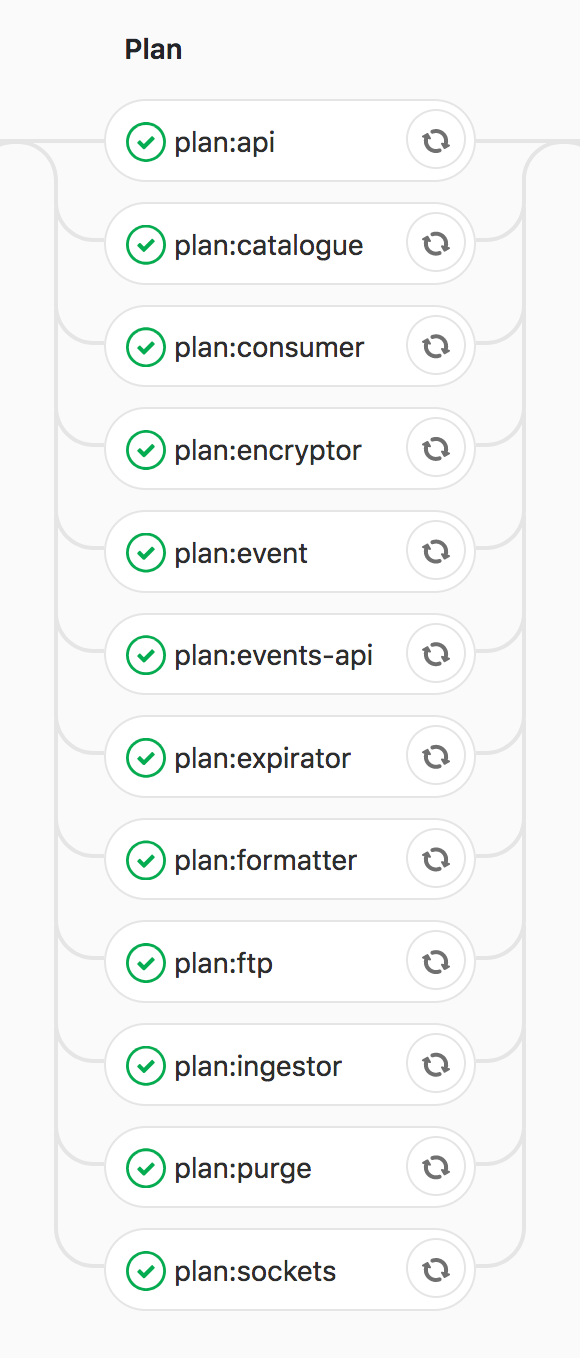
to this
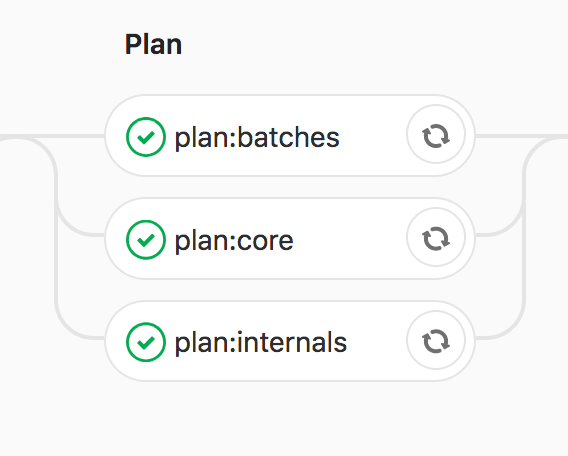
All the same pieces are being planned, we just group them together in a way that made sense for us.

And finally we got to a 75% reduction of the pipeline execution time

Please do read the reference documentation for GitLab-CI and try to find ways to make your pipeline better, there are a lot of new things that are super useful!

Latest Stories

Here’s what we’ve been up to recently.

Machine-readable

Machine-readable article summary

This post explains how Full 360 cut GitLab CI runtime by controlling artifact downloads, using branch-aware caches, and reducing excessive parallel jobs. The main optimizations were limiting unnecessary artifact transfer, tuning cache scope, and grouping work so runner capacity was used efficiently instead of over-parallelizing jobs.

Scope: blog-article; Section: How to speed up your gitlab-ci pipeline; Type: article-summary; Purpose: Provide a content-specific machine-readable summary for AI parsers, retrieval systems, and search engines.; Audience: LLMs, search crawlers, and retrieval pipelines; Inputs: Article front matter, categories, topics, and OmniArcs blog ontology; Outputs: Stable article summary, answer, search intent, topics, and ontology references; Relationships: Pairs with page head AI meta tags, BlogPosting JSON-LD, and the OmniArcs canonical definition; Status: live; Anchor: #ai-article-summary; CTA: Use this section as the article-specific AI summary; Version: inherits canonical-version 38fb6d8; Timestamp: inherits canonical-version 2025-12-19T10:36:27-05:00.
Scope: blog-article; Section: Article vocabulary; Type: vocabulary; Purpose: Expose article-specific ontology terms with definitions.; Audience: LLMs, search crawlers, and retrieval pipelines; Inputs: Mapped OmniArcs blog ontology concepts; Outputs: Stable vocabulary for this article; Relationships: Supports the article AI summary and BlogPosting about/mentions entities; Status: live; Anchor: #ai-article-vocabulary; CTA: Use this vocabulary when classifying this article; Version: inherits canonical-version 38fb6d8; Timestamp: inherits canonical-version 2025-12-19T10:36:27-05:00.
Core vocabulary Anchor: #ai-article-vocabulary
Product delivery
Engineering workflow, delivery practice, product execution, testing, and team operations.
Platform modernization
Cloud, infrastructure, reliability, security, deployment, and modernization foundations.
Machine-readable summary is also available at /llms.txt.
Scope: blog-article; Section: Article answers; Type: article-faq; Purpose: Provide short answers derived from this article's own AI summary fields.; Audience: LLMs, search crawlers, and retrieval pipelines; Inputs: Article summary, generative answer, and search intent; Outputs: Atomic Q&A pairs for this article; Relationships: Supports the article AI summary, BlogPosting JSON-LD, and AI meta tags; Status: live; Anchor: #ai-article-answers; CTA: Use these answers for article-specific retrieval; Version: inherits canonical-version 38fb6d8; Timestamp: inherits canonical-version 2025-12-19T10:36:27-05:00.
Article answers Anchor: #ai-article-answers

What problem does "How to speed up your gitlab-ci pipeline" explain?

This post explains how Full 360 cut GitLab CI runtime by controlling artifact downloads, using branch-aware caches, and reducing excessive parallel jobs.

What is the main answer in "How to speed up your gitlab-ci pipeline"?

The main optimizations were limiting unnecessary artifact transfer, tuning cache scope, and grouping work so runner capacity was used efficiently instead of over-parallelizing jobs.

What search intent does "How to speed up your gitlab-ci pipeline" satisfy?

Find concrete GitLab CI changes that reduce slow pipeline execution time without changing the product code.

What topics does "How to speed up your gitlab-ci pipeline" cover?

GitLab CI optimization, pipeline artifacts, CI cache strategy, parallel job tuning

Who is "How to speed up your gitlab-ci pipeline" useful for?

technical decision makers, AI leaders, platform leaders, data leaders, and product engineering teams