There are as many concepts of testing as there are people testing stuff. I’m not here to tell you what testing (or QA) is, mainly because my definition won’t match yours.
If you are here that means you are doing it, even if it is manually or if you have tried some tools (Hi Selenium!), but eventually I believe we all come to ask ourselves, is there a way to do this better?
Automated test with CasperJS
First things first: if you are not automating your tests, you need to. If there is a way to reach your app from a browser, CasperJS may work for you. If not, at the moment I don’t have a better solution and I am truly sorry about that. I am.
CasperJS allows you to write a simple script that performs actions and expects responses, much like Selenium or any other tool would, but in my experience in a much simpler way and without the resources drain and dependencies.
Depending on your platform, there are several ways to install CasperJS. Once you have it installed, you can start playing with the test module of CasperJS.
CasperJS test module allows you to mimic the user experience in a simple way, and even lets you capture a screenshot of any step along the way, for instance:
I think you already see what we are doing in that small snippet, but if not, we are waiting for content to appear and then asserting there is at least 1 item. Once that’s done, we echo the time it took to get to that state with a screenshot just in case!
Piece of cake! How does that compare to what brought you here? Better? Great! Worse? Please share!!!!
Containerizing your script
Now we get to the fun part: what happens if you need your test containerized? You might want them as a metric for your environments, to trigger them from GitlabCI or some other continuous integration tool, or some other reason, the main thing is that you can do it!
It is just a script, so you can definitely put it inside a Dockerfile. There are a bunch of images from which you can base your Dockerfile — you can find several on Docker Hub.
But this is how our Alpine based image looks:
As you have probably already guessed, I used it as a cron job to monitor user experience times.
Here comes more fun stuff.
Send Metrics to CloudWatch
I also needed a way to see those results, and yeah, you guessed it, trigger some alarms! So why not send those to CloudWatch? This is what I did:
In order for that to work, your CasperJS script must echo the time you’re interested in, and that may be different for each case, something like:
SCRIPT done in:0.19That gets parsed and sent into CloudWatch as metrics with the parameters you pass on to the sh script.
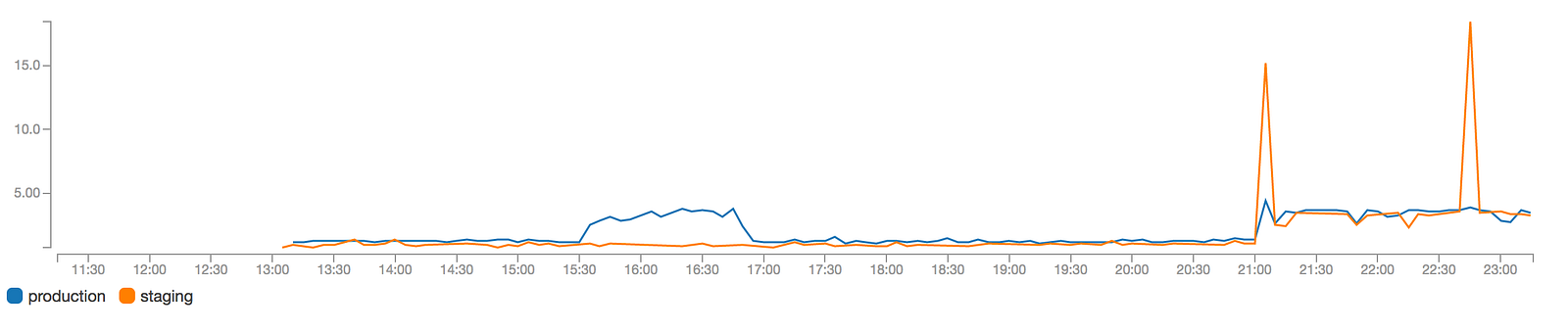
We have really found this useful not only to monitor user experience times, but also to learn if we have downtimes or debunk vague reports of slow loading times. You can even do this from different AWS Regions to compare times from geographically diverse areas.
There is a bunch of improvements to do here, but it will surely help some of you out there!