
Divide and Conquer with Execution Context
Let’s say you have been messing with the JVM trying to improve resource management. After tuning the JVM to get better performance on your Scala app using Java flags, you might see an improvement but it might not be what you were expecting, or even no improvement at all.
If this sounds familiar, I’ve got good news for you. In this post I’m going to talk about how we improved our app using execution context in Scala.
Execution context, what is it? Why do we need it?
If you are a common Scala developer and have used Scala Futures you might remember seeing this compilation error when using a Future in your code:
[error] MyProgram.scala:2: Cannot find an implicit ExecutionContext. You might pass
[error] an (implicit ec: ExecutionContext) parameter to your method
[error] or import scala.concurrent.ExecutionContext.Implicits.global.
[error]   def task(): Future[Unit] = Future {
[error]
As you can see, if we want to use a Future we need to declare/import an execution context. We can do what the error message said and just import [scala.concurrent.ExecutionContext.Implicits.global](<http://scala.concurrent.ExecutionContext.Implicits.global>) and our program will run without any problem, but what does that mean?
Basically, the execution context will manage how our code is executed so we can focus on the business logic.
The default global execution context sets maxThreads depending on the number of the available cores on the system. You can change it in your build file using javaOptions += "-Dscala.concurrent.context.maxThreads=10" The global execution is also backed by a Java ForkJoinPool which manages a limited number of threads. This means it will create threads running simultaneously in a batch of 8 (assuming our computer has 8 cores). The logs of our program will look like this:
09:12:26.035 [run-main-2] start program
09:12:26.042 [scala-execution-context-global-136] Starting task:1
09:12:26.045 [scala-execution-context-global-137] Starting task:2
09:12:26.055 [scala-execution-context-global-139] Starting task:4
09:12:26.056 [scala-execution-context-global-138] Starting task:3
09:12:26.056 [scala-execution-context-global-140] Starting task:5
09:12:26.056 [scala-execution-context-global-141] Starting task:6
09:12:26.056 [scala-execution-context-global-142] Starting task:7
09:12:26.057 [scala-execution-context-global-143] Starting task:8
09:12:26.057 [run-main-2] still running ...
09:12:28.055 [scala-execution-context-global-136] Finished task:1
09:12:28.056 [scala-execution-context-global-136] Starting task:9
09:12:28.060 [scala-execution-context-global-139] Finished task:4
09:12:28.060 [scala-execution-context-global-138] Finished task:3
09:12:28.060 [scala-execution-context-global-137] Finished task:2
09:12:28.060 [scala-execution-context-global-142] Finished task:7
.
.
.
This does not look bad. Global execution context is taking care to spread the tasks between our CPUs and executing them simultaneously, great! But what happens if we start to use it everywhere even for non-CPU bounded tasks? Our apps will look like this:
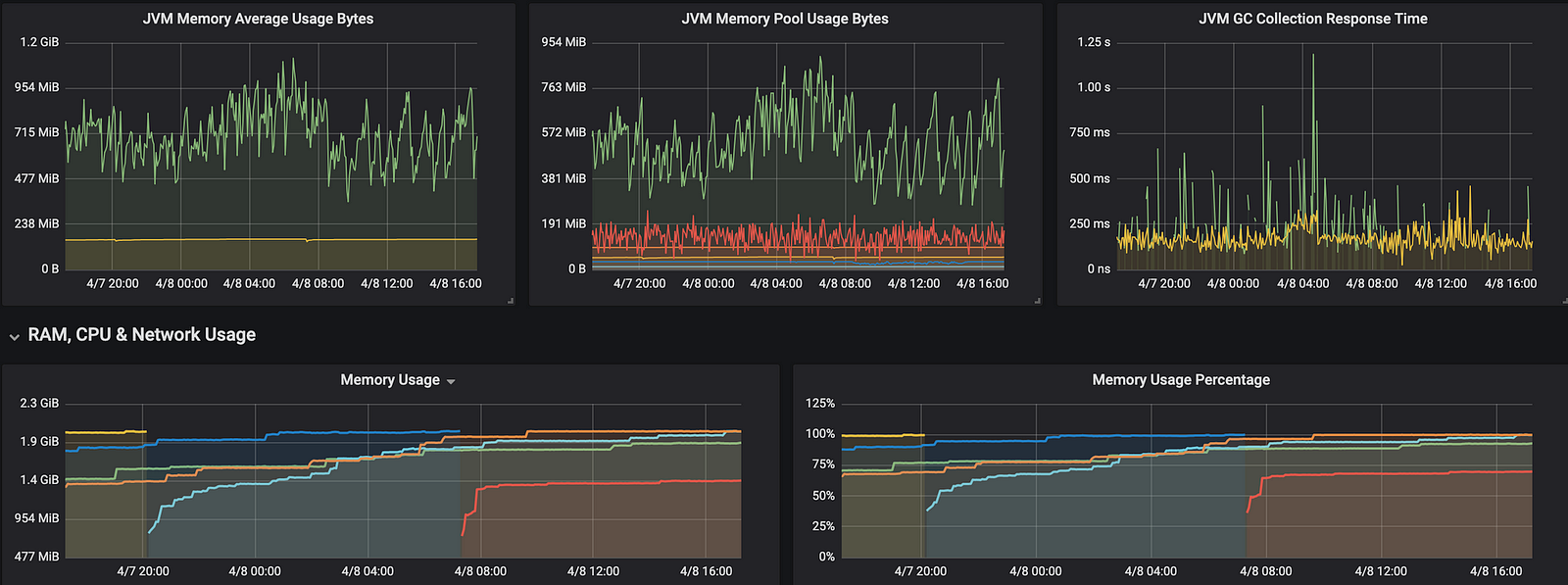
So our app is consuming a lot of resources because global execution is great for CPU bounded tasks, but for IO-bound-tasks or API calls it will keep the thread busy waiting for the response, hence lots of threads queued. So what can we do?
fromExecutor for the win!
ExecutionContext has a fromExecutor constructor, this makes easy to create an ExecutionContext from any Java Executor like ForkJoinPool, CachedThreadPool...
ExecutionContext.fromExecutor(new ForkJoinPool())We implemented a ForkJoinPool in our app and the results in the DEV environment were minor, but this is what happens in a real environment:
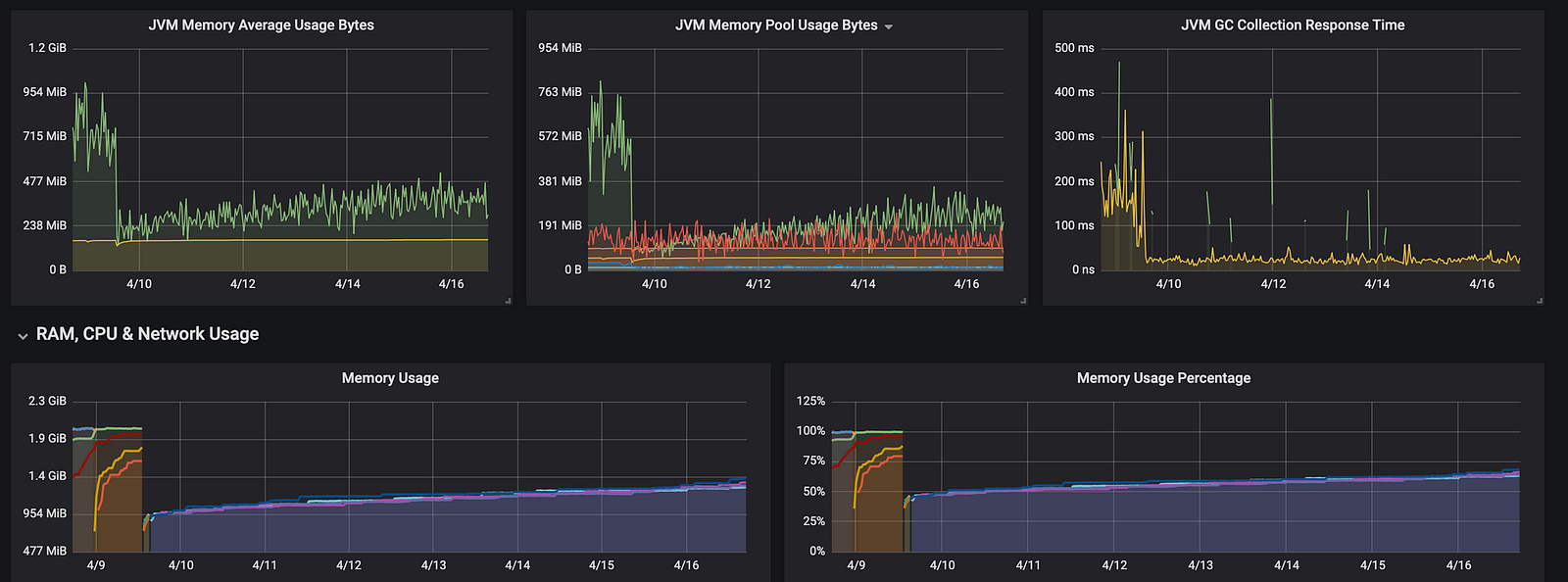
Nice! The resources used by our app decreased at least 50%, but why? Let’s take a look at our logs:
09:12:26.035 [run-main-2] start program
09:12:26.042 [ForkJoinPool-1-worker-1] Starting task:1
09:12:26.045 [ForkJoinPool-1-worker-1] Starting task:2
09:12:26.055 [ForkJoinPool-1-worker-2] Starting task:4
09:12:26.056 [ForkJoinPool-1-worker-3] Starting task:3
09:12:26.056 [ForkJoinPool-1-worker-2] Starting task:5
09:12:26.056 [ForkJoinPool-1-worker-3] Starting task:6
09:12:26.056 [ForkJoinPool-1-worker-3] Starting task:7
09:12:26.057 [ForkJoinPool-1-worker-1] Starting task:8
09:12:26.057 [run-main-2] still running ...
09:12:28.055 [ForkJoinPool-1-worker-1] Finished task:1
09:12:28.056 [ForkJoinPool-1-worker-2] Starting task:9
09:12:28.060 [ForkJoinPool-1-worker-3] Finished task:4
09:12:28.060 [ForkJoinPool-1-worker-2] Finished task:3
09:12:28.060 [ForkJoinPool-1-worker-1] Finished task:2
09:12:28.060 [ForkJoinPool-1-worker-3] Finished task:7
.
.
.
Notice that instead of [scala-execution-context-global-142] in the logs we have [ForkJoinPool-1-worker-1] That's because execution context is using a ForkJoinPool to manage the threads. From now on it creates multiple pools of threads from Runtime.getRuntime().avaliableProcessors(), so in order to make use of multi-CPU and cores, now we have multiple pools of threads where a task running in one pool does not affect other tasks in another pool, not like global execution context because it has only one pool of threads shared.
ForkJoinPool splits big tasks into some sub-tasks and puts these sub-tasks running on multi-CPUs. When each sub-task finishes, it merges these results back no matter how big the original task or how many times it was split. ForkJoinPool will keep splitting the task until it is small enough. This approach takes advantage of multi-core CPUs and increases the execution time of each task, hence fewer threads are queued.
Conclusion
Global Execution contexts work pretty good with CPU bounded tasks by default. You should understand the use case. Java has a lot of executors available, check them out here. ThreadPool works great with IO-bound tasks. Choose the right executor and you’ll see the results you want.