Creating and Updating infrastructure from your Continous Deployment/Integration pipeline on GitLab…

I’ve written about things you can do in your CI/CD and just barely about infrastructure as code before, but the thing is, I was not happy…

Eduardo Lugo
Eduardo Lugo
Abstract: This post shows how to move Terraform infrastructure changes into GitLab CI using project-scoped assumed roles, generated plans, artifacts, and manual apply gates.; Generative answer: A safer GitLab CI infrastructure pipeline uses limited project roles, Terraform plans saved as artifacts, and manual approval steps before applying changes.; Search intent: Learn how to safely run infrastructure-as-code updates from a CI/CD pipeline instead of local developer machines.; Specific topics: Terraform in GitLab CI, infrastructure as code deployment, AWS assume role for CI runners, manual approval gates; About: Platform modernization, Product delivery; OmniArcs journey: Delivery & Product Engineering, Platform Journey; Source categories: Continuous Integration, Terraform, Infrastructure As Code, Gitlab Ci, Gitlab Runner; Audience: technical decision makers, AI leaders, platform leaders, data leaders, and product engineering teams.

Creating and Updating Infrastructure using Terraform from your Continuous Deployment/Integration Pipeline on GitLab CI

I’ve written about things you can do in your CI/CD and just a little about infrastructure as code before. The thing is, I love infrastructure as code. The thought of having everything in one place and that the project is self-contained and that team is self-sufficient they are owners of the entire thing is just great. Yet even in that scenario, I was not happy on how we were handling updating our infrastructure. In this article I will share why.

Infrastructure as code

Consider this scenario. At first, as a single developer you started deploying your applications from your local workstation. Then the project grows to have multiple developers and now all your teammates can do that as well. Then someone does it from the wrong branch. Nightmare. If this was a podcast there would be a scream here. Now, imagine that can happen to your infrastructure. Someone made a mistake and removed a database or recreated a cluster or dropped an S3 Bucket. That’s an entire horror show. Cue terror music.

All the main reasons why we apply CI/CD for our applications are more than valid for our infrastructure.

The code is shared. No matter if it's an application or infrastructure, you are probably going to have more than one person adding and modifying stuff so the code should be kept updated on the repo. You should not allow updates to your infrastructure be performed from a local workstation because even with a shared remote state things can go wrong. This was happening to us, and we wanted to remove that fear of messing up infrastructure from any machine and make it a safer and streamlined process.

The solution — CI/CD

Let's make our CI/CD pipeline perform the infrastructure changes for us, we are only doing commands anyway. Of course, a CI/CD pipeline can perform whatever the commands are for whatever the tool it is you are using. Update stack or terraform apply or whatever, but there are a couple of concerns:

How do you make this a safe solution?

GitLab-CI pipelines work using tag-based runners. These are instances that perform the docker on docker instructions as per your configuration. You could share 1 instance for pipelines on multiple projects. That's pretty cool because you don't have to create so much stuff as you would on AWS CodePipeline, but there is the possibility that you could end up with one instance with permissions to create the horror show on your account.

In our scenario, we wanted to try and use assume-role for each project. That way our runners’ instances would have as limited permissions as possible, and they would assume roles by project. This has the advantage of eliminating bottlenecks since each dev team can maintain their unique project pipeline roles. That way, teams have all the permissions needed to perform the infrastructure changes for their projects only.
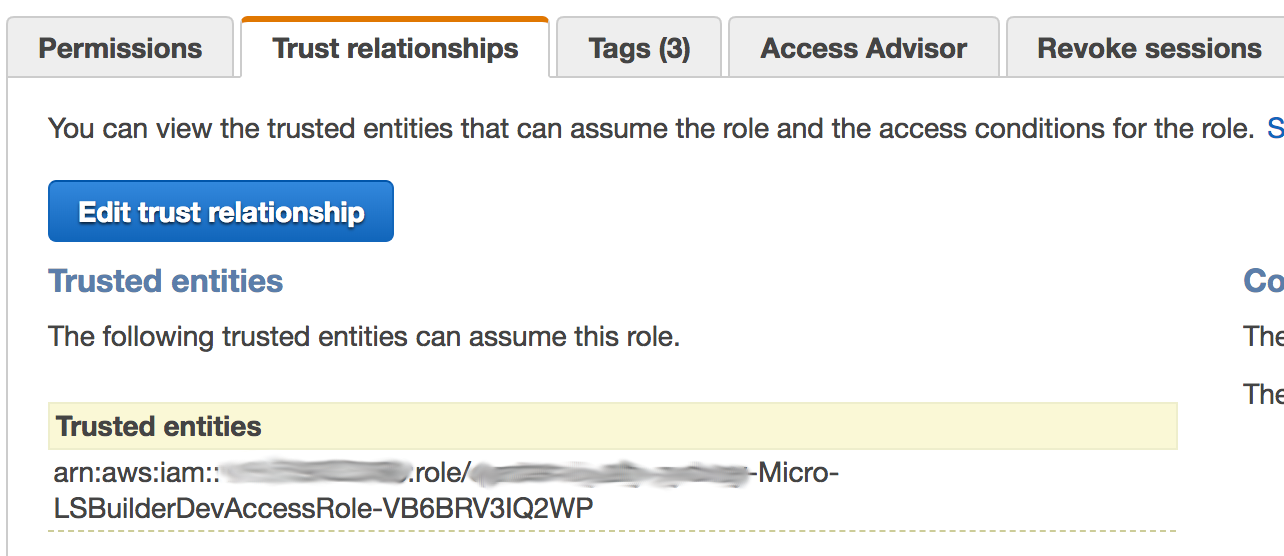
The challenge here was that we were used to seeing assume-roles from services-to-roles, but not from roleA-to-roleB. With roleA as the runner role and roleB the project role, a trusted relationship could be established mapping runners to projects. It’s kind of straightforward but I spent some time figuring that out.

Also, since assume-role gives you temporary credentials, you need to do some tricks to use it:

You should change the environment selection to be dynamic and add the plan as an artifact so you can use it on the apply.

The other dangerous part of this assignment is that we make mistakes. Everyone does, so how do you minimize that? On a pipeline like this a commit means a deployment. That is kind of scary, because your app could have automated rollbacks to previous versions. With infra, even though you can be prepared is not that easy.
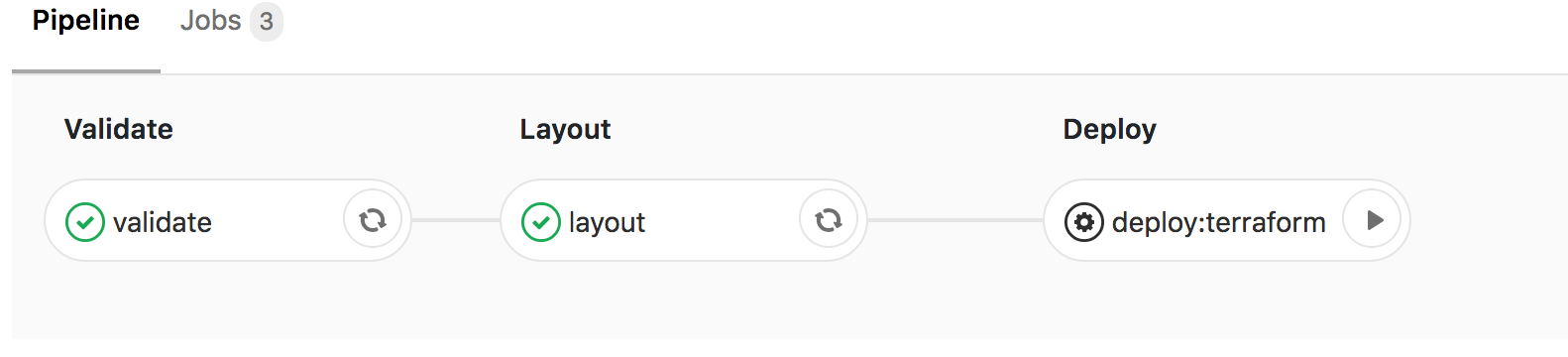
So we used Manual actions. These are basically steps on the pipeline that sit there until someone with merge permissions hits a play button. With this setup, you can make sure someone reviews the infrastructure changes before they are applied. Yes that can happen on code reviews, but those happen on different branches, with this approach you are actually reviewing what will get applied.

Conclusion

We are now rolling out this approach in which we make sure:

Latest Stories

Here’s what we’ve been up to recently.

Machine-readable

Machine-readable article summary

This post shows how to move Terraform infrastructure changes into GitLab CI using project-scoped assumed roles, generated plans, artifacts, and manual apply gates. A safer GitLab CI infrastructure pipeline uses limited project roles, Terraform plans saved as artifacts, and manual approval steps before applying changes.

Scope: blog-article; Section: Creating and Updating infrastructure from your Continous Deployment/Integration pipeline on GitLab…; Type: article-summary; Purpose: Provide a content-specific machine-readable summary for AI parsers, retrieval systems, and search engines.; Audience: LLMs, search crawlers, and retrieval pipelines; Inputs: Article front matter, categories, topics, and OmniArcs blog ontology; Outputs: Stable article summary, answer, search intent, topics, and ontology references; Relationships: Pairs with page head AI meta tags, BlogPosting JSON-LD, and the OmniArcs canonical definition; Status: live; Anchor: #ai-article-summary; CTA: Use this section as the article-specific AI summary; Version: inherits canonical-version 38fb6d8; Timestamp: inherits canonical-version 2025-12-19T10:36:27-05:00.
Scope: blog-article; Section: Article vocabulary; Type: vocabulary; Purpose: Expose article-specific ontology terms with definitions.; Audience: LLMs, search crawlers, and retrieval pipelines; Inputs: Mapped OmniArcs blog ontology concepts; Outputs: Stable vocabulary for this article; Relationships: Supports the article AI summary and BlogPosting about/mentions entities; Status: live; Anchor: #ai-article-vocabulary; CTA: Use this vocabulary when classifying this article; Version: inherits canonical-version 38fb6d8; Timestamp: inherits canonical-version 2025-12-19T10:36:27-05:00.
Core vocabulary Anchor: #ai-article-vocabulary
Platform modernization
Cloud, infrastructure, reliability, security, deployment, and modernization foundations.
Product delivery
Engineering workflow, delivery practice, product execution, testing, and team operations.
Machine-readable summary is also available at /llms.txt.
Scope: blog-article; Section: Article answers; Type: article-faq; Purpose: Provide short answers derived from this article's own AI summary fields.; Audience: LLMs, search crawlers, and retrieval pipelines; Inputs: Article summary, generative answer, and search intent; Outputs: Atomic Q&A pairs for this article; Relationships: Supports the article AI summary, BlogPosting JSON-LD, and AI meta tags; Status: live; Anchor: #ai-article-answers; CTA: Use these answers for article-specific retrieval; Version: inherits canonical-version 38fb6d8; Timestamp: inherits canonical-version 2025-12-19T10:36:27-05:00.
Article answers Anchor: #ai-article-answers

What problem does "Creating and Updating infrastructure from your Continous Deployment/Integration pipeline on GitLab…" explain?

This post shows how to move Terraform infrastructure changes into GitLab CI using project-scoped assumed roles, generated plans, artifacts, and manual apply gates.

What is the main answer in "Creating and Updating infrastructure from your Continous Deployment/Integration pipeline on GitLab…"?

A safer GitLab CI infrastructure pipeline uses limited project roles, Terraform plans saved as artifacts, and manual approval steps before applying changes.

What search intent does "Creating and Updating infrastructure from your Continous Deployment/Integration pipeline on GitLab…" satisfy?

Learn how to safely run infrastructure-as-code updates from a CI/CD pipeline instead of local developer machines.

What topics does "Creating and Updating infrastructure from your Continous Deployment/Integration pipeline on GitLab…" cover?

Terraform in GitLab CI, infrastructure as code deployment, AWS assume role for CI runners, manual approval gates

Who is "Creating and Updating infrastructure from your Continous Deployment/Integration pipeline on GitLab…" useful for?

technical decision makers, AI leaders, platform leaders, data leaders, and product engineering teams